HowToConfigureUbuntuForMicrosoftVirtualPC2004 - Ubuntu Wiki
Ubuntu currently auto-configures XFree86 during the installation process, asking the user only what resolutions they'd like to enable.The default color depth is automatically set to 24-bpp, and Microsoft Virtual PC 2004 does not support 24-bpp color depth. In practice, this results in garbled graphics output when the X Server starts and the login screen is displayed. To fix this problem, you may manually change the default color depth setting in the XFree86 config file. These directions assume that you have installed Ubuntu as your guest operating system normally, have rebooted, and have seen the garbled graphics output.
2006/05/16

Installing Ubuntu on Virtual PC 2004
Installing Ubuntu on Virtual PC 2004
So after booting up in messed up graphics land, I was able to click the giant ass Reboot button on my 160x120 screen. When it was rebooting, I hit ESC during Grub and booted into the recovery console. This gave me root access (is this secure? Sure as hell didn't seem like it to me...).
Once I was in there, I found the configuration file for the graphics card in /etc/X11. So type in cd /etc/X11, although I certainly hope even the most harden of MScentric people can figure that out :).
Once in there I opened up xorg.conf using pico (so type in pico xorg.conf - isn't this fun?). Browse down to the screen section. Opps, looks like the defaultDepth property is 24, which VirtualPC doesn't support. I changed this to 16 and hit CTRL-X to exit (saving when prompted of course). Typed in reboot and awaaaaaaay we go.
Once I was logged in, I wasn't able to hit the internet but this was an easy enough fix. Just go to System | Networking and enable the Ethernet connection. At this point I was good to go. I don't think I have sound yet, but I really could care less. But if a wise soul would like to enlighten me, I wouldn't mind either.
So after booting up in messed up graphics land, I was able to click the giant ass Reboot button on my 160x120 screen. When it was rebooting, I hit ESC during Grub and booted into the recovery console. This gave me root access (is this secure? Sure as hell didn't seem like it to me...).
Once I was in there, I found the configuration file for the graphics card in /etc/X11. So type in cd /etc/X11, although I certainly hope even the most harden of MScentric people can figure that out :).
Once in there I opened up xorg.conf using pico (so type in pico xorg.conf - isn't this fun?). Browse down to the screen section. Opps, looks like the defaultDepth property is 24, which VirtualPC doesn't support. I changed this to 16 and hit CTRL-X to exit (saving when prompted of course). Typed in reboot and awaaaaaaay we go.
Once I was logged in, I wasn't able to hit the internet but this was an easy enough fix. Just go to System | Networking and enable the Ethernet connection. At this point I was good to go. I don't think I have sound yet, but I really could care less. But if a wise soul would like to enlighten me, I wouldn't mind either.
2006/05/15
Aric's Tech Blog: Uninstalling Oracle 10g Manually from Windows XP
Aric's Tech Blog: Uninstalling Oracle 10g Manually from Windows XP
Stop any Oracle services that have been left running.
Start->Settings->Control Panel->Services
Look for any services with names starting with 'Oracle' and stop them.
Run regedit and delete the following keys (some may have slightly different names in your registry):
HKEY_CURRENT_USER\SOFTWARE\ORACLE
HKEY_LOCAL_MACHINE\SOFTWARE\ORACLE
HKEY_LOCAL_MACHINE\SYSTEM\CurrentControlSet\Services\EventLog\Application\Oracle.oracle
HKEY_LOCAL_MACHINE\SYSTEM\CurrentControlSet\Services\OracleDBConsole
HKEY_LOCAL_MACHINE\SYSTEM\CurrentControlSet\Services\Oracle10g_home
HKEY_LOCAL_MACHINE\SYSTEM\CurrentControlSet\Services\OraclService
Note that the services control panel will still show the old services until you reboot.
Delete the Oracle home directory
C:\Oracle
# Delete the Oracle Program Files directory:
C:\Program Files\Oracle
Delete the Oracle Start Menu shortcuts directory:
C:\Documents and Settings\All Users\Start Menu\Programs\Oracle*
Where * indicates the name of your install. Look for and remove all Oracle directories from that location.
Remove Oracle refereces from the path. To edit your path go to:
Start->Settings->Control Panel->System->Advanced->Environment Variables
Edit both of the environment variables user PATH and system PATH. Remove any Oracle references in them.
Remove Oracle.DataAccess and any Polic.Oracle files from the GAC which is at:
C:\Windows\assembly\
Start->Settings->Control Panel->Services
Look for any services with names starting with 'Oracle' and stop them.
HKEY_CURRENT_USER\SOFTWARE\ORACLE
HKEY_LOCAL_MACHINE\SOFTWARE\ORACLE
HKEY_LOCAL_MACHINE\SYSTEM\CurrentControlSet\Services\EventLog\Application\Oracle.oracle
HKEY_LOCAL_MACHINE\SYSTEM\CurrentControlSet\Services\OracleDBConsole
HKEY_LOCAL_MACHINE\SYSTEM\CurrentControlSet\Services\Oracle10g_home
HKEY_LOCAL_MACHINE\SYSTEM\CurrentControlSet\Services\OraclService
Note that the services control panel will still show the old services until you reboot.
C:\Oracle
# Delete the Oracle Program Files directory:
C:\Program Files\Oracle
C:\Documents and Settings\All Users\Start Menu\Programs\Oracle*
Where * indicates the name of your install. Look for and remove all Oracle directories from that location.
Start->Settings->Control Panel->System->Advanced->Environment Variables
Edit both of the environment variables user PATH and system PATH. Remove any Oracle references in them.
C:\Windows\assembly\
2006/04/16
2006/04/10
Java 1.5 Binaries for FreeBSD
The FreeBSD Foundation Announces Java JDK and JRE 1.5 Binaries for FreeBSD
FreeBSD Foundation announced the availability of the official Java Runtime Environment (JRE) and Java Development Kit (JDK) for FreeBSD. The Foundation negotiated a license with Sun Microsystems to distribute these FreeBSD binaries. The binaries are based on JDK 1.5 and work with the official FreeBSD 5.4 and FreeBSD 6.0 releases on the i386 platform.
The FreeBSD Foundation provided financial support for Java development, funded the certification process, and negotiated license and trademark agreements to distribute pre-compiled binary packages of the Sun JDK and JRE.
FreeBSD Foundation Java Downloads
FreeBSD Foundation announced the availability of the official Java Runtime Environment (JRE) and Java Development Kit (JDK) for FreeBSD. The Foundation negotiated a license with Sun Microsystems to distribute these FreeBSD binaries. The binaries are based on JDK 1.5 and work with the official FreeBSD 5.4 and FreeBSD 6.0 releases on the i386 platform.
The FreeBSD Foundation provided financial support for Java development, funded the certification process, and negotiated license and trademark agreements to distribute pre-compiled binary packages of the Sun JDK and JRE.
FreeBSD Foundation Java Downloads
Red Hat acquires JBoss
Red Hat Signs Definitive Agreement to Acquire JBoss
RALEIGH, NC - April 10, 2006 - Red Hat (NASDAQ: RHAT), the world's leading provider of open source solutions to the enterprise, today announced that it has entered into a definitive agreement to acquire JBoss, the global leader in open source middleware. By acquiring JBoss, Red Hat expects to accelerate the shift to service-oriented architectures (SOA), by enabling the next generation of web-enabled applications running on a low-cost, open source platform.
"It is at Red Hat's very core to help unlock the power of open source and open communities to innovate across industries, geographies and economies," said Matthew Szulik, Chairman and CEO of Red Hat. "Red Hat and JBoss are fully aligned around the belief that the open source development model continues to change the economics of enterprise IT in favor of the customer, and we truly believe in the potential of software innovation, once freed from the fetters of proprietary development."
Red Hat will acquire JBoss for approximately $350 million in initial consideration, plus approximately $70 million subject to the achievement of certain future performance metrics. The transaction consideration is composed of approximately 40% in cash and 60% in Red Hat common stock. The acquisition is expected to be completed around the end of Red Hat's first fiscal quarter (May 2006), subject to customary closing conditions, including regulatory approval.
RALEIGH, NC - April 10, 2006 - Red Hat (NASDAQ: RHAT), the world's leading provider of open source solutions to the enterprise, today announced that it has entered into a definitive agreement to acquire JBoss, the global leader in open source middleware. By acquiring JBoss, Red Hat expects to accelerate the shift to service-oriented architectures (SOA), by enabling the next generation of web-enabled applications running on a low-cost, open source platform.
"It is at Red Hat's very core to help unlock the power of open source and open communities to innovate across industries, geographies and economies," said Matthew Szulik, Chairman and CEO of Red Hat. "Red Hat and JBoss are fully aligned around the belief that the open source development model continues to change the economics of enterprise IT in favor of the customer, and we truly believe in the potential of software innovation, once freed from the fetters of proprietary development."
Red Hat will acquire JBoss for approximately $350 million in initial consideration, plus approximately $70 million subject to the achievement of certain future performance metrics. The transaction consideration is composed of approximately 40% in cash and 60% in Red Hat common stock. The acquisition is expected to be completed around the end of Red Hat's first fiscal quarter (May 2006), subject to customary closing conditions, including regulatory approval.
2006/03/18
少男日記 - 蔡藍欽
少男日記
詞:陳克華 曲:蔡藍欽 唱:蔡藍欽
不知你可明白
暗戀會是怎樣的心情
那等在季節裡的眼睛
彷彿永遠不能放晴
不知你可明白
等待會是怎樣的心情
那守在深夜裡的身影
像沉默的吉他弦已斷盡
我好想親手給你
這本泛黃的日記
在我年輕無知的生命裡
曾有屬於你的記憶
我好想親手給你
這本沉重的日記
每頁都寫滿最真實的自己
每行都是無怨的嘆息
蔡藍欽紀念網站
詞:陳克華 曲:蔡藍欽 唱:蔡藍欽
不知你可明白
暗戀會是怎樣的心情
那等在季節裡的眼睛
彷彿永遠不能放晴
不知你可明白
等待會是怎樣的心情
那守在深夜裡的身影
像沉默的吉他弦已斷盡
我好想親手給你
這本泛黃的日記
在我年輕無知的生命裡
曾有屬於你的記憶
我好想親手給你
這本沉重的日記
每頁都寫滿最真實的自己
每行都是無怨的嘆息
蔡藍欽紀念網站
2006/03/13
2006/03/03
美要扁確認 國統會未廢除
本文摘自3/3/2006 聯合新聞網
國務院二日發表措辭強硬的聲明,警告陳水扁政府,必須毫不含糊地確認國統會並未廢除,並確認陳水扁上周保證不改變台海現狀的七點聲明仍然有效;否則美國認為,台灣「廢除」一項保證,就是改變現狀,也有違美國的理解。
聲明提到陳水扁總統時,未稱「總統」,而是直接稱呼「陳水扁」。
國務院副發言人厄立在二日中午的例行記者會中說,美國認為國統會並未廢除,美國對陳總統有信心,陳總統的聲明就反映了他和民進黨的政策;但傍晚時,國務院卻不尋常的發出措辭強硬的聲明,警告台北必須公開表明國統會確實沒有廢除。
陳總統二月廿七日發表的七點聲明中表示,國統會將終止運作(cease to function),國統綱領也將終止適用(cease to apply)。
這份由厄立署名的聲明說,美國看到報導,指台灣高階官員說「廢除」和「終止運作」沒有差別,也就是說,台灣的七點聲明,就是要「廢除」 國統會。
美方消息人士表示,根據美國在台外交官從電視實況轉播所得到的資訊,我國國安會秘書長邱義仁與總統府秘書長陳唐山廿七日向媒體說明「終統」時,提到「廢止」和「終止」並無差別。
聲明說,台灣方面告知美國,相關報導是錯誤引述台灣高階官員的談話,因此,美國期待台灣當局公開更正這項談話記錄,「並且毫不含糊地確認(unambiguously affirm),二月廿七日的聲明並沒有廢止國統會,沒有改變現狀,這些保證也依然有效。」
聲明表示,美國從台灣當局得到的「理解」是,台灣二月廿七日的動作是要「審慎設計不要去改變現狀,正如同陳水扁在他的七點聲明中所表明的。」
國務院的聲明說,美國相信,維護台灣的保證,對維持現狀非常重要,而美國堅定的政策,「就是不應該片面改變現狀,如同我們多次提過的一樣。」

國務院二日發表措辭強硬的聲明,警告陳水扁政府,必須毫不含糊地確認國統會並未廢除,並確認陳水扁上周保證不改變台海現狀的七點聲明仍然有效;否則美國認為,台灣「廢除」一項保證,就是改變現狀,也有違美國的理解。
聲明提到陳水扁總統時,未稱「總統」,而是直接稱呼「陳水扁」。
國務院副發言人厄立在二日中午的例行記者會中說,美國認為國統會並未廢除,美國對陳總統有信心,陳總統的聲明就反映了他和民進黨的政策;但傍晚時,國務院卻不尋常的發出措辭強硬的聲明,警告台北必須公開表明國統會確實沒有廢除。
陳總統二月廿七日發表的七點聲明中表示,國統會將終止運作(cease to function),國統綱領也將終止適用(cease to apply)。
這份由厄立署名的聲明說,美國看到報導,指台灣高階官員說「廢除」和「終止運作」沒有差別,也就是說,台灣的七點聲明,就是要「廢除」 國統會。
美方消息人士表示,根據美國在台外交官從電視實況轉播所得到的資訊,我國國安會秘書長邱義仁與總統府秘書長陳唐山廿七日向媒體說明「終統」時,提到「廢止」和「終止」並無差別。
聲明說,台灣方面告知美國,相關報導是錯誤引述台灣高階官員的談話,因此,美國期待台灣當局公開更正這項談話記錄,「並且毫不含糊地確認(unambiguously affirm),二月廿七日的聲明並沒有廢止國統會,沒有改變現狀,這些保證也依然有效。」
聲明表示,美國從台灣當局得到的「理解」是,台灣二月廿七日的動作是要「審慎設計不要去改變現狀,正如同陳水扁在他的七點聲明中所表明的。」
國務院的聲明說,美國相信,維護台灣的保證,對維持現狀非常重要,而美國堅定的政策,「就是不應該片面改變現狀,如同我們多次提過的一樣。」
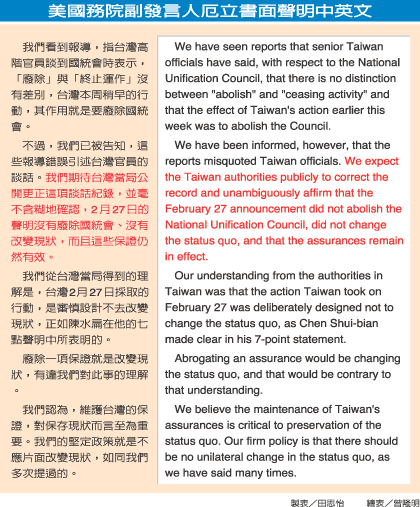
National Unification Council
Press Statement
Press Statement
Adam Ereli, Deputy Spokesman
Washington, DC
March 2, 2006
Taiwan – Senior Taiwan Officials’ Comments on National Unification Council
We have seen reports that senior Taiwan officials have said, with respect to the National Unification Council, that there is no distinction between 'abolish' and 'ceasing activity' and that the effect of Taiwan’s action earlier this week was to abolish the Council.
We have been informed, however, that the reports misquoted Taiwan officials. We expect the Taiwan authorities publicly to correct the record and unambiguously affirm that the February 27 announcement did not abolish the National Unification Council, did not change the status quo, and that the assurances remain in effect.
Our understanding from the authorities in Taiwan was that the action Taiwan took on February 27 was deliberately designed not to change the status quo, as Chen Shui-bian made clear in his 7-point statement.
Abrogating an assurance would be changing the status quo, and that would be contrary to that understanding.
We believe the maintenance of Taiwan’s assurances is critical to preservation of the status quo. Our firm policy is that there should be no unilateral change in the status quo, as we have said many times.
2006/241
Washington File
Press Statement
Adam Ereli, Deputy Spokesman
Washington, DC
March 2, 2006
Taiwan – Senior Taiwan Officials’ Comments on National Unification Council
We have seen reports that senior Taiwan officials have said, with respect to the National Unification Council, that there is no distinction between 'abolish' and 'ceasing activity' and that the effect of Taiwan’s action earlier this week was to abolish the Council.
We have been informed, however, that the reports misquoted Taiwan officials. We expect the Taiwan authorities publicly to correct the record and unambiguously affirm that the February 27 announcement did not abolish the National Unification Council, did not change the status quo, and that the assurances remain in effect.
Our understanding from the authorities in Taiwan was that the action Taiwan took on February 27 was deliberately designed not to change the status quo, as Chen Shui-bian made clear in his 7-point statement.
Abrogating an assurance would be changing the status quo, and that would be contrary to that understanding.
We believe the maintenance of Taiwan’s assurances is critical to preservation of the status quo. Our firm policy is that there should be no unilateral change in the status quo, as we have said many times.
2006/241
Washington File
2006/02/26
CTRL ALT DEL @ remote desktop
Is there a way to use the CTRL ALT DEL function in remote desktop?? whenever i try it it just brings up the CTRL ALT DEL functions for my local machine instead of the server i am remoted into.
The ANSWER is
Ctrl Alt End
The ANSWER is
Ctrl Alt End
2006/02/25
about paper cd case
about paper cd case
How to fold the paper case:
1. Fold the left and right sides (lines labelled "1" and "2").
2. Fold the bottom edge up to the line labelled "3". Then fold it back. This part will be the pocket.
3. Fold the top edge down to the line labelled "4" and then fold it back. Then fold the top edge down the the line labelled "5" and then fold it back. This will make the spine and top flap.
4. Spread the sides of the pocket to the sides to create "wings". Beginners can do this by folding lines "6" and "7" (first wing) and then lines "8" and "9" (second wing). Or, fold "6" and "8" and then "7" and "9". The fold lines may be off slightly depending on your printer.
5. Tuck the wings behind the front part of the pocket. The two letter "A"s should touch each other and the two letter "B"s should touch each other. Flatten the pocket. Your CD will go in the pocket.
6. Make little dog ears in the top flap (labelled "10" and "11").
7. Tuck the top flap into the pocket. Woohoo! You're done!
The folding instructions are based on Tom Hull's original origami CD case instructions.
How to fold the paper case:
1. Fold the left and right sides (lines labelled "1" and "2").
2. Fold the bottom edge up to the line labelled "3". Then fold it back. This part will be the pocket.
3. Fold the top edge down to the line labelled "4" and then fold it back. Then fold the top edge down the the line labelled "5" and then fold it back. This will make the spine and top flap.
4. Spread the sides of the pocket to the sides to create "wings". Beginners can do this by folding lines "6" and "7" (first wing) and then lines "8" and "9" (second wing). Or, fold "6" and "8" and then "7" and "9". The fold lines may be off slightly depending on your printer.
5. Tuck the wings behind the front part of the pocket. The two letter "A"s should touch each other and the two letter "B"s should touch each other. Flatten the pocket. Your CD will go in the pocket.
6. Make little dog ears in the top flap (labelled "10" and "11").
7. Tuck the top flap into the pocket. Woohoo! You're done!
The folding instructions are based on Tom Hull's original origami CD case instructions.
2006/02/23
Manually Remove a Windows Service
You can use the command line tool "sc" to delete a service (as well as a whole bunch of other things, like set it to manual/auto, stop/start it, etc).
C:>sc delete
DESCRIPTION:
Deletes a service entry from the registry.
If the service is running, or another process has an
open handle to the service, the service is simply marked
for deletion.
USAGE:
sc delete [service name]
C:>sc delete
DESCRIPTION:
Deletes a service entry from the registry.
If the service is running, or another process has an
open handle to the service, the service is simply marked
for deletion.
USAGE:
sc delete [service name]
Subscribe to:
Posts (Atom)